Checkmk for SAP
Monitor your SAP systemsin Checkmk.
See the health of your SAP systems in the Checkmk you already use, with the same dashboards and alerts as the rest of your IT. Also for RISE with SAP.
- No agents on SAP hosts
- Read-only access
- About 85 checks per SAP system
- Licensed per SAP system
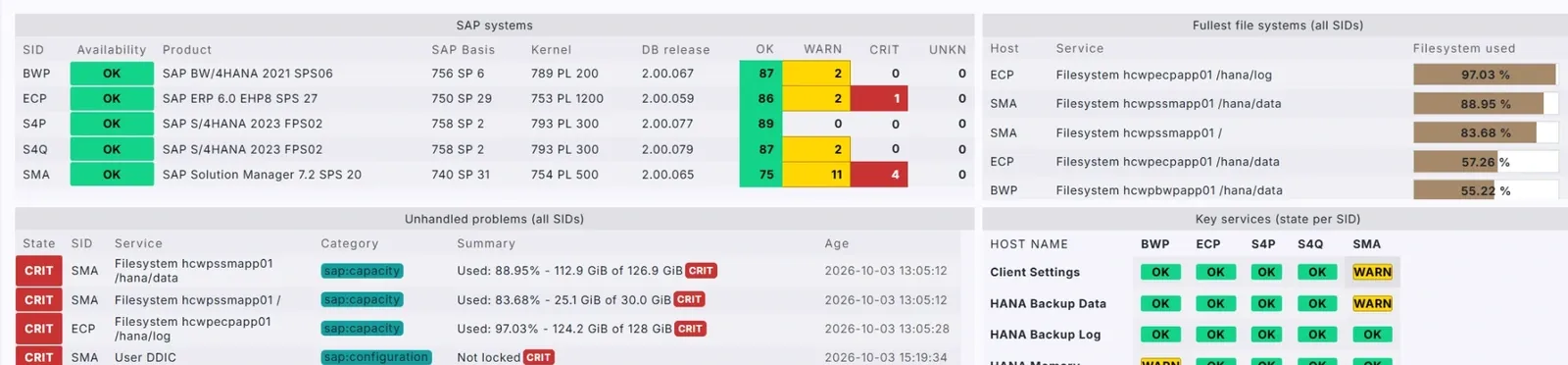
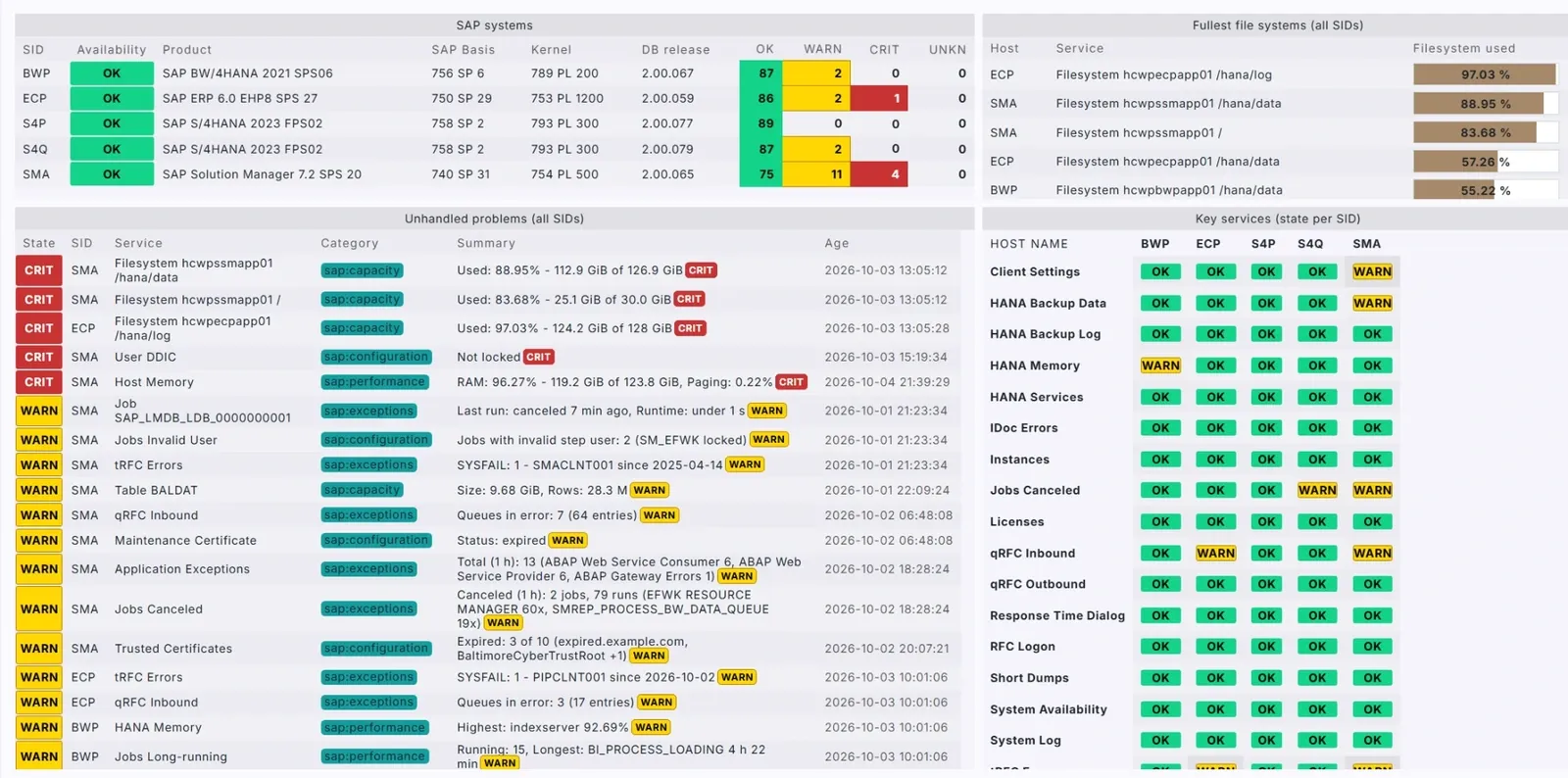
How it works
Checkmk reads your SAP systems. Your team gets the alerts.
An extension for the Checkmk you already run.
Your team
- Dashboards
- Alerts
- ITSMServiceNow, Jira, ...
Checkmk
for SAP
Your SAP systems
On-premises, private cloud or RISE with SAP
Agentless and read-only
Nothing to install on your SAP hosts. Checkmk reads SAP with a read-only user and changes nothing.
One Checkmk host per SAP system
Each SAP system appears as one host. Its checks, about 85 with SAP Cloud ALM, are set up automatically.
Alerts and dashboards in Checkmk
Thresholds, notifications and dashboards work as for any other host. Alerts go by email, to on-call or to your ITSM tool.
What it checks
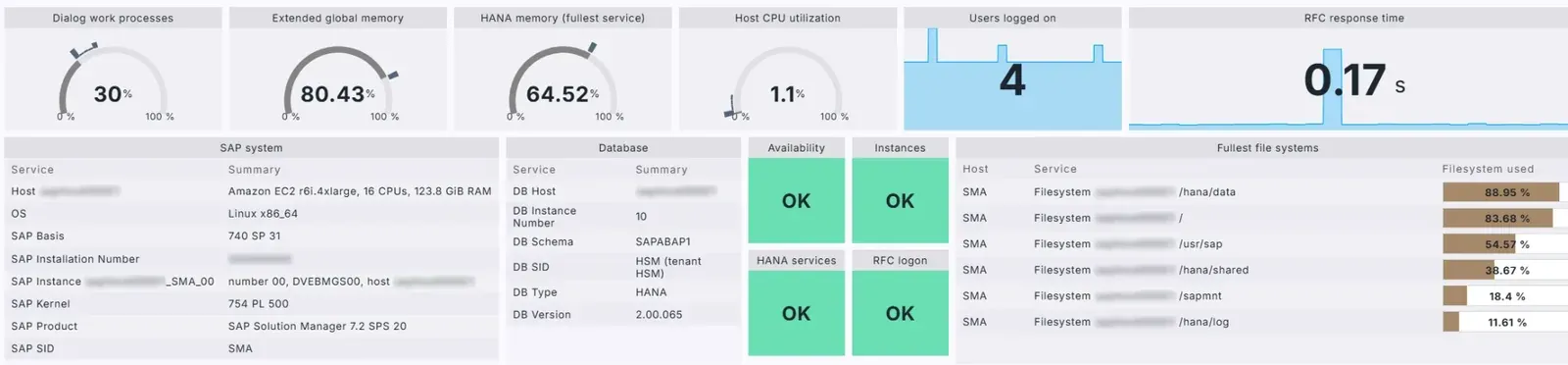
About 85 checks per SAP system. This is one SAP system in Checkmk.
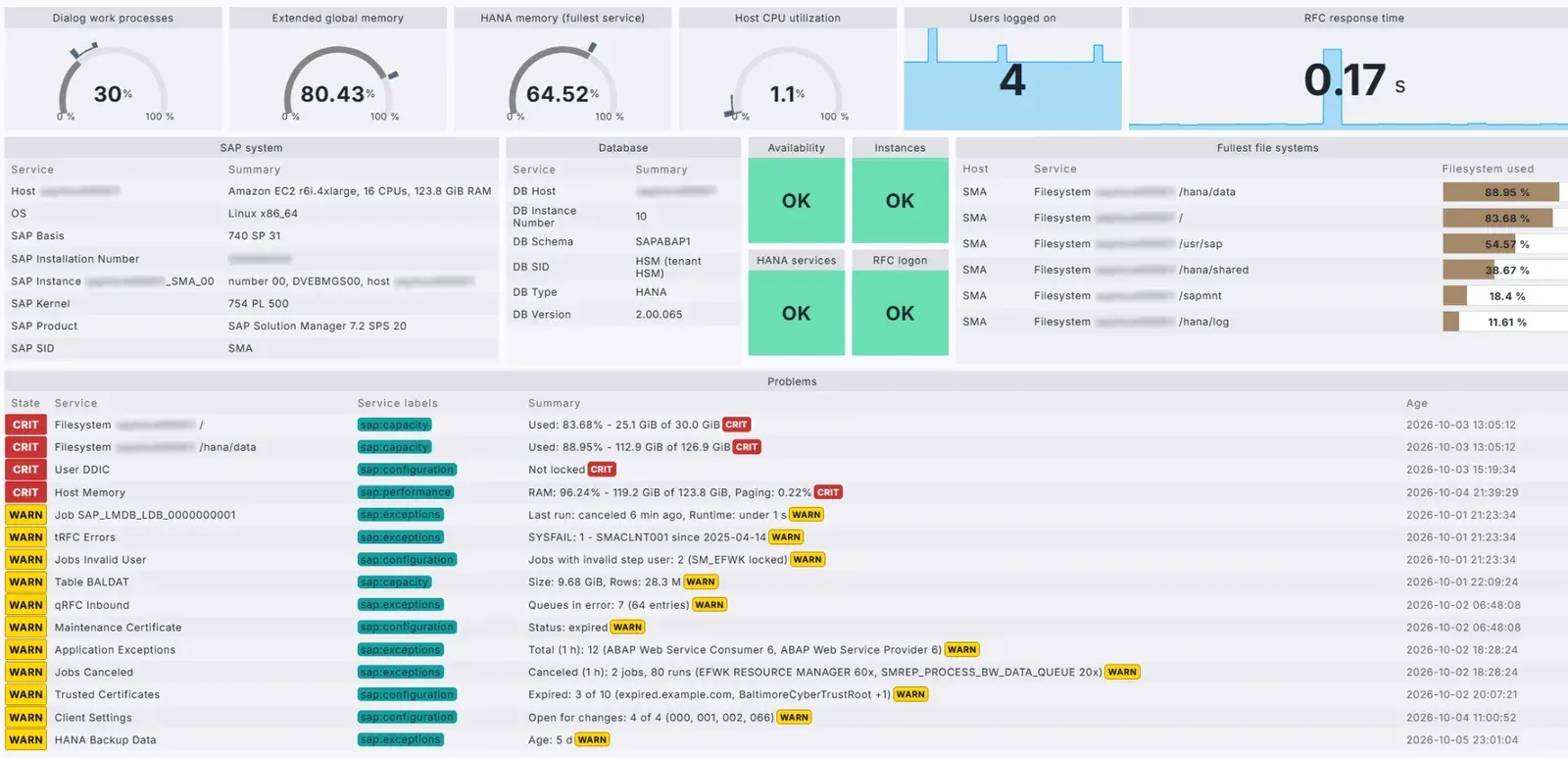
Swipe to see more
Checks by category
The most common checks, plus the objects you choose to watch.
- Availability
sap:availability - System Availability
- Instances
- RFC Logon
- HANA Services
- Performance
sap:performance - Work Processes
- Response Time
- Users Logged On
- Update Backlog
- Jobs Long-running
- Host CPU
- Host Memory
- HANA Memory
- Exceptions
sap:exceptions - Short Dumps
- System Log
- Application Exceptions
- Update Terminations
- Jobs Canceled
- qRFC Inbound / Outbound
- tRFC Errors
- IDoc Errors
- Transport Imports
- HANA Backup Data / Log
- Capacity
sap:capacity - Filesystem
- ABAP Resources
- ICM
- RFC Gateway
- Number Ranges
- Enqueue Table
- HANA Disk
- Table sizes
- Configuration
sap:configuration - Certificates
- Licenses
- Maintenance Certificate
- Client Settings
- Jobs Invalid User
- System information middle of the dashboard
- SAP Product
- SAP Basis
- SAP Kernel
- Database
- Operating system
- Your own watch list objects you pick
- Job
- User
- Queue
- IDoc interface
- RFC Connection
SAP monitoring after 2027
Your options side by side
A real alternative – monitor SAP and all your non-SAP IT in one tool.
Vendor support
- Checkmk for SAP
- Advantage: Lynxmind subscription
- SAP Solution Manager 7.2
- Drawback: Mainstream ends 2027
- SAP Focused Run
- Advantage: Beyond 2030
- SAP Cloud ALM
- Advantage: SAP's SaaS successor
Agents on SAP hosts
- Checkmk for SAP
- Advantage: None (agentless)
- SAP Solution Manager 7.2
- Drawback: Diagnostics + Host Agent
- SAP Focused Run
- Drawback: Simple Diagnostics + Host Agent
- SAP Cloud ALM
- Advantage: None for ABAP
History
- Checkmk for SAP
- Advantage: Up to 4 years
- SAP Solution Manager 7.2
- In its built-in BW
- SAP Focused Run
- Advantage: Up to 75 months
- SAP Cloud ALM
- 180 days (raw data)
Non-SAP monitoring
- Checkmk for SAP
- Advantage: Servers, network, cloud, apps
- SAP Solution Manager 7.2
- SAP-centric
- SAP Focused Run
- SAP-centric
- SAP Cloud ALM
- Mainly SAP
Custom metrics
- Checkmk for SAP
- Advantage: Yes
- SAP Solution Manager 7.2
- Advantage: Yes
- SAP Focused Run
- Advantage: Yes
- SAP Cloud ALM
- Limited
Cost
Effort to first systems *
- Checkmk for SAP
- 2–3 days
- SAP Solution Manager 7.2
- 5–8 weeks
- SAP Focused Run
- 5–8 weeks
- SAP Cloud ALM
- 1–2 weeks
Note 1: Lynxmind estimate, once the RFC user and network path are ready; depends on your landscape.
Note 2: Always confirm SAP costs with your SAP sales representative.
SAP product information as of October 2026.
FAQ
Frequently asked questions
Do we need to install or change anything in SAP?
Nothing is installed in SAP. The only change in each SAP system is one read-only technical user, created from our role template. The software runs on your Checkmk server and only reads data. One optional feature, off until you switch it on, asks SAP to test the connections you pick.
Does it work with RISE with SAP?
Yes. It needs no access to the operating system or the database. A read-only technical user is enough, and SAP Cloud ALM can add data about hosts and databases. On-premises and private cloud systems work the same way.
Do we need SAP Cloud ALM?
No, it is optional. The read-only user works on its own, and so does SAP Cloud ALM. With both you get the most checks, because some data, such as response times, CPU, memory and disk usage, comes from SAP Cloud ALM only.
What do we need, and how is it licensed?
Checkmk 2.3 or later on a Linux server, plus a read-only technical user in each SAP system and SAP's connection library (neither is needed with SAP Cloud ALM only). Licensed per SAP system and checked on your own Checkmk server. Prices are in the comparison above; contact us for a trial.
What does it not cover?
It covers SAP systems built on ABAP, such as SAP S/4HANA, SAP ERP or SAP BW. It does not cover SAP Java systems, SAP Web Dispatcher or the state of high-availability clusters. Where you have access to the servers, Checkmk's own agent can monitor the operating system and database alongside it.
Get started
Tell us about your SAP landscape
Choose the conversation that fits your team. Tell us how many SAP systems you run and where monitoring is hardest today.
We will review it and reply with the most useful next step.
Prefer email? info@lynxmind.com
SAP, SAP Cloud ALM, RISE with SAP, SAP S/4HANA and other SAP products and services mentioned herein, as well as their respective logos, are trademarks or registered trademarks of SAP SE (or an SAP affiliate company) in Germany and other countries. Checkmk, ServiceNow, Jira and all other product names are trademarks of their respective owners. Checkmk for SAP is a Lynxmind product, not a product of SAP or Checkmk GmbH.